



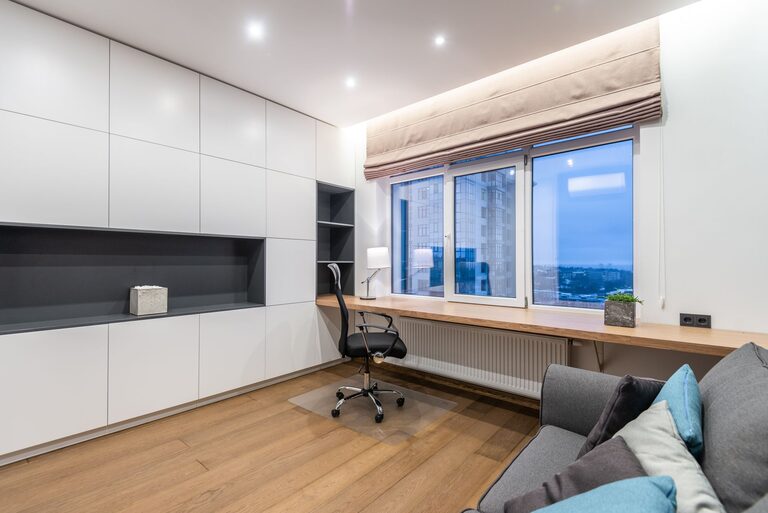
Creating a cozy and functional home workspace is essential for anyone who works from home, studies, or enjoys creative projects. A well-designed workspace not only boosts productivity but also contributes to your overall comfort and wellbeing. Whether you have a dedicated room or a small corner, these tips will help you design an inviting and efficient area that suits your needs.
Choose the Right Location
Finding the perfect spot is the first step in creating a productive work environment. Consider these factors when picking your workspace location:
– Natural Light: Choose a spot near a window for natural light, which can enhance mood and focus.
– Quietness: Pick a quiet area away from household distractions.
– Space Needs: Ensure the space can accommodate your desk, chair, and necessary equipment.
– Ventilation: Good airflow helps keep the area fresh and comfortable during long work sessions.
If space is limited, even a corner or a nook can be transformed into an inviting workspace.
Invest in Comfortable and Ergonomic Furniture
Comfort is key for long hours at your desk. Ergonomic furniture supports good posture and reduces strain.
– Ergonomic Chair: Choose a chair with adjustable height, lumbar support, and comfortable padding.
– Appropriate Desk: Your desk should fit your equipment comfortably and allow you to maintain proper posture.
– Standing Desks: Consider adjustable desks that allow you to alternate between sitting and standing.
Remember to position your monitor at eye level and keep your keyboard and mouse within easy reach.
Personalize Your Space
Adding personal touches to your workspace makes it cozy and inviting, helping you feel more motivated.
– Decorate with Plants: Indoor plants add freshness and can reduce stress.
– Artwork and Inspiration: Hang art, photos, or motivational quotes that inspire you.
– Color Scheme: Choose calming or energizing colors based on your preference. Soft blues and greens are soothing, while yellows and oranges can energize.
– Soft Textures: Incorporate cushions, throws, or rugs for warmth and texture.
Balancing personalization with a clutter-free environment is important to keep focus.
Optimize Lighting
Good lighting reduces eye strain and boosts productivity. Combine natural and artificial light sources.
– Natural Light: Use sheer curtains to control glare while allowing light to pass.
– Task Lighting: Desk lamps with adjustable brightness provide focused light for reading or detailed work.
– Ambient Lighting: Soft overhead lighting creates a comfortable atmosphere.
– Avoid Glare: Position screens to minimize reflections from windows or lamps.
Consider using warm light bulbs for a cozy feel.
Organize and Declutter
A tidy workspace helps reduce distractions and keeps you focused.
– Use Storage Solutions: Shelving, drawers, and containers keep supplies organized.
– Cable Management: Use clips or sleeves to organize cords and prevent tangling.
– Daily Clean-Up: Spend a few minutes at the end of each day tidying your desk.
– Limit Decorations: Keep only essential or meaningful items on your desk to avoid clutter.
An organized space promotes calmness and efficiency.
Incorporate Functional Technology
The right technology supports your work without causing frustration.
– Reliable Internet: A strong and fast connection is crucial for most home workspaces.
– Quality Equipment: Invest in a good monitor, keyboard, mouse, and headset if needed.
– Charging Stations: Keep devices charged and ready with convenient power strips or wireless chargers.
– Backup Solutions: Use cloud storage or external drives to protect your work.
Make sure your workspace layout accommodates your technology needs.
Create a Routine and Boundaries
A cozy workspace also supports mental comfort by helping you separate work from home life.
– Set Work Hours: Stick to a schedule to maintain balance.
– Use Visual Cues: Closing a door or using a divider signals work time.
– Take Breaks: Incorporate short breaks to stretch or relax to avoid burnout.
– End-of-Day Ritual: Clear your workspace and shut down devices to transition out of work mode.
Maintaining boundaries helps protect both productivity and relaxation.
Add Comfort Accessories
Small additions can increase comfort and reduce fatigue.
– Footrests: Support your feet for better circulation.
– Ergonomic Accessories: Wrist rests or keyboard pads reduce strain.
– Temperature Control: Use fans or heaters according to the season.
– Hydration Station: Keep a water bottle nearby to stay hydrated.
Comfortable settings keep you energized throughout the day.
Final Thoughts
Designing a cozy and functional home workspace is about balancing comfort with productivity. By choosing the right location, investing in ergonomic furniture, personalizing your space, optimizing lighting, organizing thoughtfully, and setting clear routines, you’ll create an environment that makes working from home enjoyable and effective. Remember, a well-designed workspace is an investment in your health and success.