



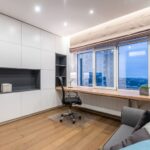
Creating a comfortable and productive home office space is key to working efficiently and maintaining well-being throughout your workday. Whether you’re new to remote work or looking to improve your current setup, small changes can make a significant difference. This guide offers practical tips to help you design a home office that supports focus, comfort, and creativity.
Choosing the Right Location
Selecting the ideal spot for your home office is the first step. Consider a quiet corner or a spare room where you can minimize distractions. Natural light is a major plus—it helps reduce eye strain and boosts mood. If possible, choose a space near a window to enjoy daylight and fresh air.
If space is limited, don’t worry. Even a small area can become a functional office with the right organization and furniture.
Investing in Comfortable Furniture
A good chair and desk are essential for comfort and productivity.
– Ergonomic Chair: Look for a chair that offers adjustable height, lumbar support, and comfortable padding. This helps prevent back pain during long hours of sitting.
– Appropriate Desk: A desk at the right height keeps your wrists and arms in a neutral position. Consider a desk with enough surface area for your computer, paperwork, and any other essentials.
– Standing Desks: If you like to alternate between sitting and standing, a sit-stand desk could add flexibility and improve your posture.
Organizing Your Workspace
Clutter can negatively affect focus. Keeping your workspace clean and organized is important.
– Storage Solutions: Use shelves, drawers, or filing cabinets to store documents and supplies out of sight.
– Desk Organizers: Trays, pencil holders, and cable management tools can keep your desktop tidy.
– Minimalism: Only keep what you need on your desk to reduce distractions.
Creating the Right Lighting
Proper lighting reduces eye strain and keeps you alert.
– Natural Light: Position your desk near a window but avoid glare on your screen.
– Task Lighting: A desk lamp with adjustable brightness helps when working in the evening or in areas with poor overhead lighting.
– Ambient Lighting: Soft overhead lights or floor lamps can make the entire room comfortable.
Setting Up Technology Efficiently
Make sure your tech setup supports your workflow without causing frustration.
– Reliable Internet Connection: A strong Wi-Fi signal or wired connection is crucial.
– Quality Equipment: Invest in a good monitor, keyboard, and mouse for comfort and efficiency.
– Cable Management: Use clips and sleeves to reduce cable clutter.
Personalizing Your Space
Adding personal touches can make your office feel inviting and motivate you throughout the day.
– Decor: Plants, artwork, or photos can brighten your space.
– Colors: Choose colors you find calming or inspiring.
– Comfort Items: A small cushion, cozy blanket, or aromatherapy diffuser can enhance comfort.
Establishing Routine and Boundaries
Creating clear work habits helps maintain productivity.
– Set Work Hours: Define when you start and stop working to separate professional and personal time.
– Breaks: Take regular breaks to stretch and rest your eyes.
– Avoid Distractions: Use noise-canceling headphones or apps that block distracting websites.
Maintaining Your Workspace
Regular upkeep keeps your home office functional and pleasant.
– Daily Tidying: Spend a few minutes at the end of each day cleaning your desk.
– Weekly Checks: Assess your setup and make adjustments as needed.
– Upgrading Gear: Replace worn-out or outdated equipment to maintain comfort and efficiency.
—
Designing your home office to be both comfortable and productive doesn’t require a large budget or space. By focusing on ergonomic furniture, good lighting, organization, and personal touches, you can create a workspace that supports your best work every day. Remember, the goal is to make your home office a place where you feel good and can accomplish your tasks effectively.